
Creating a Test Plan - MIC WiFi 6G
The MIC WiFi 6G option is used for Japan MIC technical conformity certification testing of 6 GHz RLAN products (Wi-Fi 6E / Wi-Fi 7, etc.).
Basic Settings
The figure below takes Wi-Fi 6E as an example.
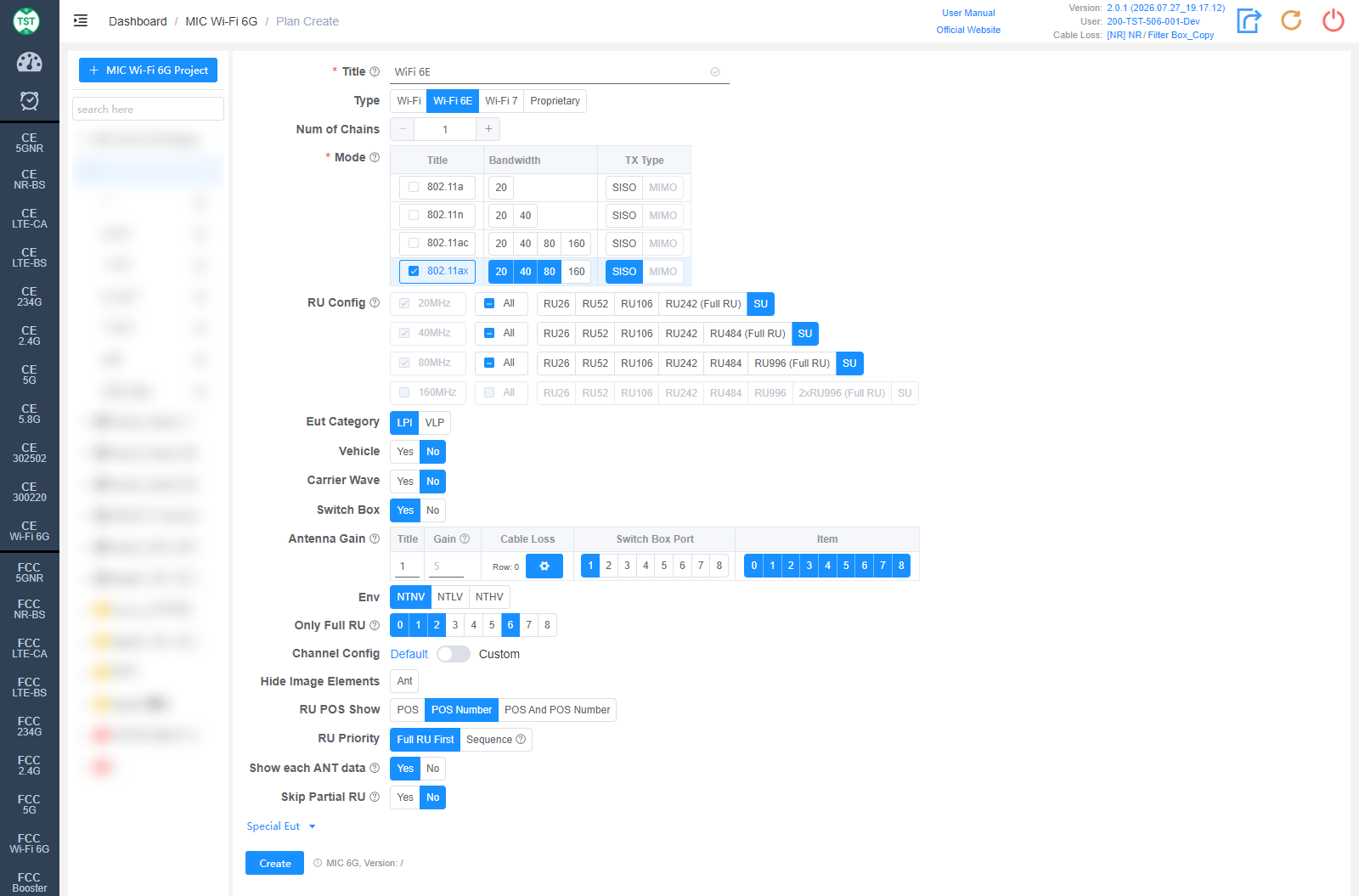
Title: Test plan name, entered by the user.
Type: Technical category. Select the corresponding Wi-Fi standard, or Proprietary for self-defined products:
Wi-Fi: All 802.11 modes (a / n / ac / ax / be).
Wi-Fi 6E: 802.11a / n / ac / ax.
Wi-Fi 7: 802.11be.
Proprietary: Self-defined product.
Num of Chains: Number of transmit chains (antennas).
Mode: Modes supported by the product (required). After checking a mode, select the Bandwidth (20 / 40 / 80 / 160 MHz...) and TX Type (SISO / MIMO).
RU Config: RU (Resource Unit) configurations supported by 802.11ax / be devices, selected per bandwidth. Full RU of each bandwidth is mandatory; SU (Single User) can be checked separately.
Eut Category: 6 GHz equipment category: LPI (Low Power Indoor) / VLP (Very Low Power).
Vehicle: Whether the product is used in vehicles, default No.
Carrier Wave: Whether the product supports carrier wave transmission. For the frequency error test.
Switch Box: Whether to use a Switch Box (RF switch).
Antenna Gain: Antenna gain and cable loss configuration:
Title / Gain: Antenna number and gain (dBi).
Cable Loss: Cable loss from the product's antenna port to the Switch Box or spectrum analyzer. How to Create Common Cable Loss.
Switch Box Port: Port number of the switch connected to the antenna.
Item: Test items per antenna; the numbers correspond to:
(M6000) Duty Cycle
(M6001) Frequency Error
(M6002) Occupied Bandwidth
(M6003) Antenna Power
(M6004) Adjacent Channel Leakage Power
(M6005) Out Of Bands Leakage Power
(M6006) Transmission Burst Length
(M6007) Spurious Emission Intensity
(M6008) Secondary Radiated Emission
Env: Environmental conditions, multi-select: NTNV / NTLV / NTHV (normal / low / high voltage at normal temperature).
Only Full RU: For the checked items, only Full RU will be tested.
Channel Config: Channel configuration, Default or Custom.
Hide Image Elements: Elements to hide in report images (e.g., the Ant marker).
RU POS Show: How RU positions are displayed in the report: POS / POS Number / POS And POS Number.
RU Priority: RU test priority: Full RU First or Sequence (RU26 → RU52 → RU106...).
Show each ANT data: Whether to show each antenna's data for MIMO. For spurious emissions and out-of-band emission.
Skip Partial RU: Whether to skip Partial RU testing.
Special Eut

The following settings can generally be kept at their default values. Adjust them only when the test results are abnormal or there are special test requirements.
Min Power: Minimum power (dBm), 0 is auto.
100% Duty Cycle: Whether the sample's duty cycle is 100%: Unknown / Yes / No.
OOB Detector: Detector for out-of-band measurements: Peak / Peak+Avg.
Special Setting: Special settings. Options prefixed with [D] are debug options:
[D] Virtual Data / [D] Random Data / [D] Ignore Eut Confirm / [D] Random Status: Debug options.
DC One Mode: A mode only measures one duty cycle.
100k RBW for TXSE: Use 100 kHz RBW for TXSE (30 MHz ~ 1000 MHz). Requires a re-test to take effect.
Corresponding software option: MIC 6G