
Creating a Test Plan - MIC LTE-BS
The MIC LTE-BS option is used for Japan MIC technical conformity certification testing of LTE base station products. Base station testing feeds the test signal via a signal generator (VSG) and measures the output with a spectrum analyzer (SA).
Basic Settings
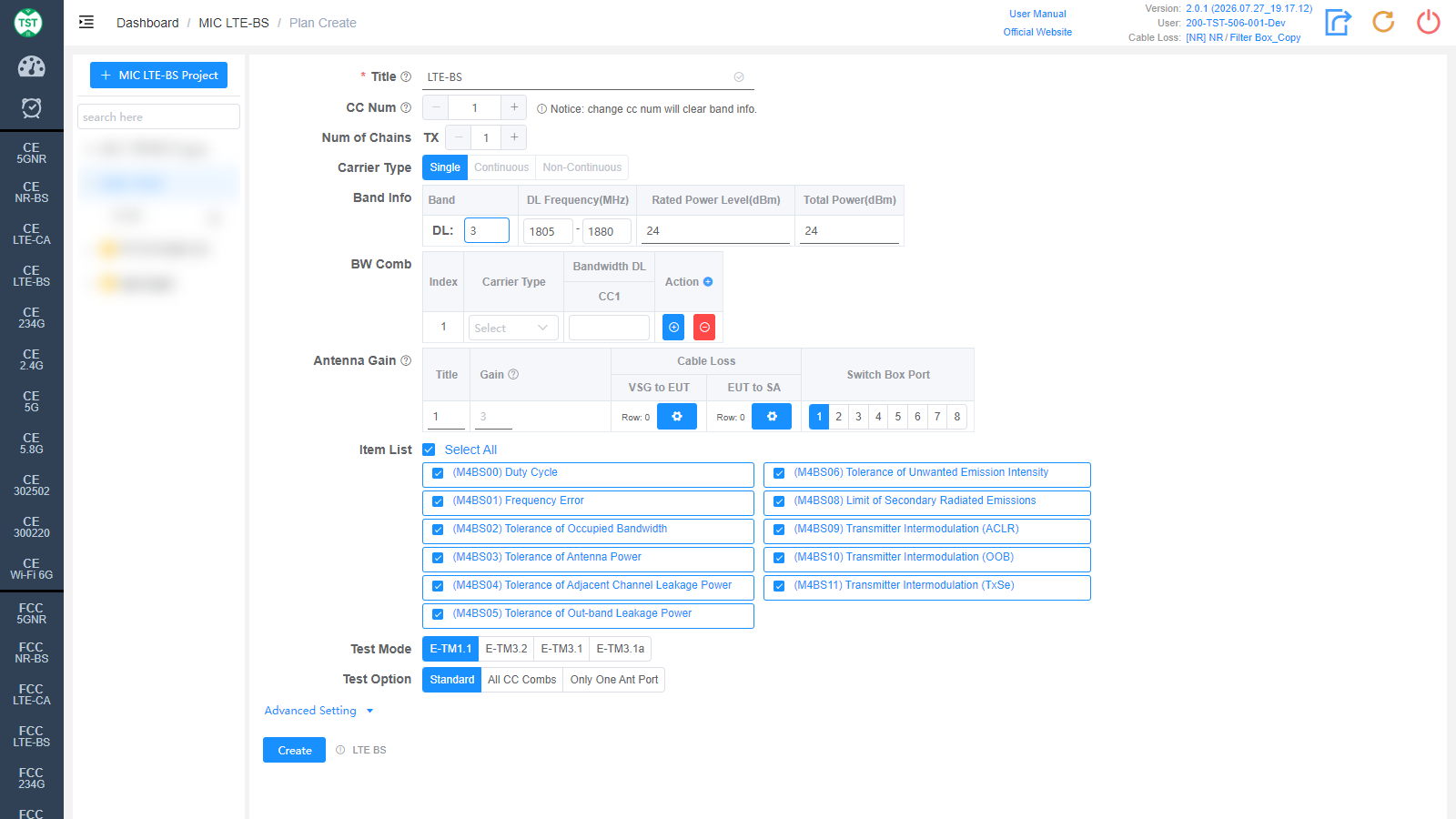
Title: Test plan name, entered by the user.
CC Num: Number of carriers. Note: changing CC Num will clear the Band Info.
Num of Chains: Number of transmit chains (TX).
Carrier Type: Carrier types, multi-select: Single / Continuous / Non-Continuous.
Band Info: LTE bands supported by the product:
Band: LTE band number. Japanese bands are finely subdivided: besides standard bands (1 / 3 / 8 / 28 / 34 / 40 / 41 / 42, etc.), there are operator-specific variants (1KDDI / 1KDDI-A / 8a / 8b, etc.). Select according to the bands declared for the product.
DL Frequency(MHz): Downlink frequency range, auto-filled and editable.
Rated Power Level(dBm): Rated power level.
Total Power(dBm): Total output power.
BW Comb: Bandwidth combination table. For each Index, configure Carrier Type / Bandwidth DL and the bandwidth of each carrier (CC1...); use the +/- icons to add or remove combinations.
Antenna Gain: Antenna gain and cable loss configuration:
Title / Gain: Antenna number and gain (dBi).
Cable Loss - VSG to EUT: Cable loss from the signal generator to the EUT.
Cable Loss - EUT to SA: Cable loss from the EUT to the spectrum analyzer. How to Create Common Cable Loss.
Switch Box Port: Port number of the switch connected to the antenna.
Item List: Test items included in MIC LTE-BS, all selected by default:
(M4BS00) Duty Cycle
(M4BS01) Frequency Error
(M4BS02) Tolerance of Occupied Bandwidth
(M4BS03) Tolerance of Antenna Power
(M4BS04) Tolerance of Adjacent Channel Leakage Power
(M4BS05) Tolerance of Out-band Leakage Power
(M4BS06) Tolerance of Unwanted Emission Intensity
(M4BS08) Limit of Secondary Radiated Emissions
(M4BS09) Transmitter Intermodulation (ACLR)
(M4BS10) Transmitter Intermodulation (OOB)
(M4BS11) Transmitter Intermodulation (TxSe)
Test Mode: 3GPP E-UTRA test models, multi-select: E-TM1.1 / E-TM3.2 / E-TM3.1 / E-TM3.1a. Select according to certification requirements.
Test Option: Test scope: Standard / All CC Combs (test all carrier combinations) / Only One Ant Port.
Continuous Type: Continuous carrier type: Standard / Non-Standard.
Advanced Setting
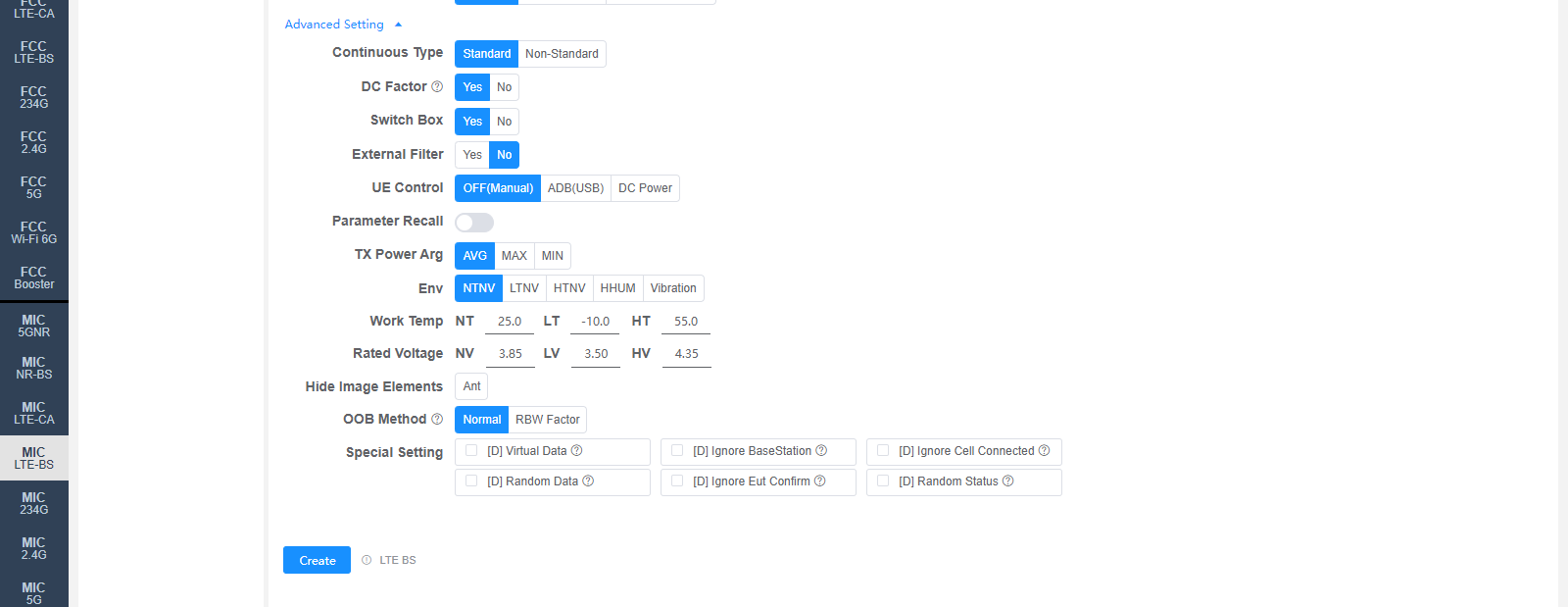
All settings in Advanced Setting can generally be kept at their default values. Adjust them only when the test results are abnormal or there are special test requirements.
DC Factor: Whether to enable duty cycle factor correction. For spurious emission tests.
Switch Box: Whether to use a Switch Box (RF switch).
External Filter: Whether an external filter is used in the RF path.
UE Control: How to control the sample restart:
OFF(Manual): Manual control, no software control.
ADB(USB): Control the sample via ADB.
DC Power: Restart the sample by switching the DC power supply.
Parameter Recall: Whether to recall a parameter configuration file stored in the base station emulator.
TX Power Arg: TX power evaluation method: AVG / MAX / MIN.
Env: Environmental conditions, multi-select: NTNV / LTNV / HTNV / HHUM / Vibration.
Work Temp: Temperatures (°C) for the environmental conditions, default NT 25.0 / LT -10.0 / HT 55.0.
Rated Voltage: Voltages (V) for the environmental conditions, default NV 3.85 / LV 3.50 / HV 4.35.
Hide Image Elements: Elements to hide in report images (e.g., the Ant marker).
OOB Method: Measurement method for the out-band leakage power: Normal / RBW Factor. The default value can be changed on the Setting page.
Special Setting: Special settings. Options prefixed with [D] are debug options:
[D] Virtual Data / [D] Ignore BaseStation / [D] Ignore Cell Connected / [D] Random Data / [D] Ignore Eut Confirm / [D] Random Status: Debug options.
Corresponding software option: LTE BS