
Creating a Test Plan - MIC 34G
The MIC 34G option is used for Japan MIC technical conformity certification testing of cellular products (3G WCDMA / 4G LTE). When creating a test plan, select the Type (technology) first; the form will show the corresponding options for the selected technology. Each technology is described separately below.
WCDMA
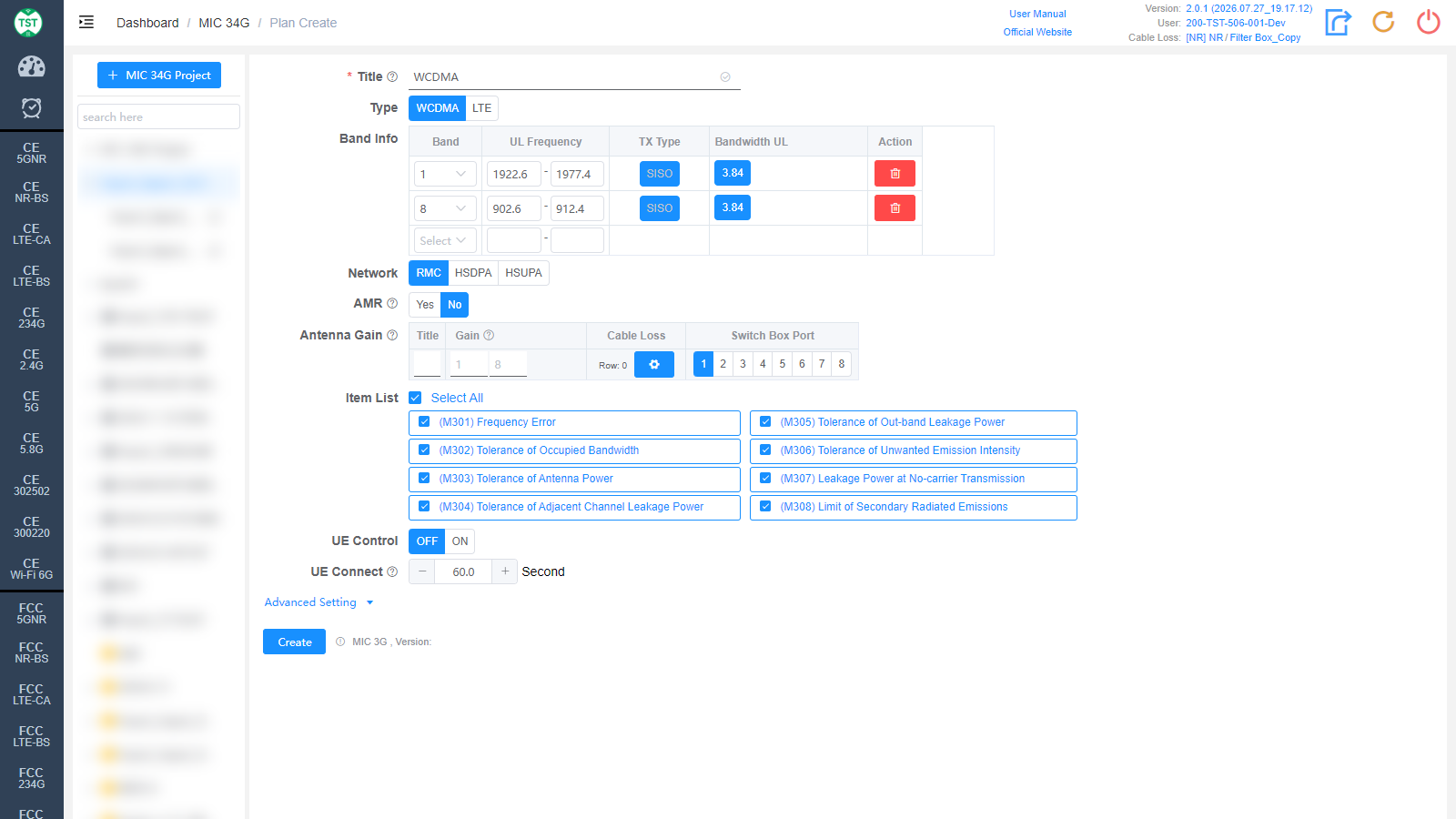
Title: Test plan name, entered by the user, e.g., WCDMA / B1 / LTE-Ant1.
Type: Technical category, selectable WCDMA / LTE, select WCDMA here.
Band Info: Operating bands supported by the product, one band per row:
Band: WCDMA band number, e.g., Band 1 / 8 (commonly used by Japanese operators). After selecting from the drop-down, the system automatically fills in the corresponding uplink frequency.
UL Frequency: Uplink frequency range (MHz) of the band, filled in automatically and editable.
TX Type: Transmission type, fixed to SISO.
Bandwidth UL: Uplink channel bandwidth, fixed to 3.84 (chip rate 3.84 Mcps) for WCDMA.
Action: Click the red delete icon to remove a band row; select a band from the bottom Select drop-down to add a new row.
Network: Network modes supported by the product, multi-select: RMC / HSDPA / HSUPA. Select according to the product's actual support.
AMR: Whether the product supports AMR (Adaptive Multi-rate) voice, default No. AMR is for voice connections. This option appears after a Network is selected.
Antenna Gain: Antenna gain and cable loss configuration:
Title: Antenna number, named sequentially by default as 1, 2, 3, 4..., or manually input other names according to customer requirements.
Gain: Gain (dBi) of each antenna in the corresponding band. Generally 0 for products with built-in antennas such as phones and tablets.
Cable Loss: Cable loss of the RF cable from the product's antenna port to the Switch Box or the spectrum analyzer. How to Create Common Cable Loss.
Switch Box Port: Port number of the switch connected to the product's antenna, e.g., Ant1 connected to port 1, Ant2 connected to port 2.
Row: Click the number to change the number of antenna rows (i.e., the number of antennas); click the gear icon to manage cable loss details.
Item List: Test items included in WCDMA (MIC 3G), all selected by default:
(M301) Frequency Error
(M302) Tolerance of Occupied Bandwidth
(M303) Tolerance of Antenna Power
(M304) Tolerance of Adjacent Channel Leakage Power
(M305) Tolerance of Out-band Leakage Power
(M306) Tolerance of Unwanted Emission Intensity
(M307) Leakage Power at No-carrier Transmission
(M308) Limit of Secondary Radiated Emissions
Note: In some standards, test parameters are mutually referenced between items. If only some items are checked, the test may not be able to proceed. It is recommended to create the test plan with the default items.
UE Control: Whether the software automatically controls the sample, default OFF. When OFF, the sample state (e.g., reboot, airplane mode) must be controlled manually during the test.
UE Connect: UE connection waiting time (seconds), default 60. That is, the timeout for the UE to connect to the base station emulator or to start up.
LTE
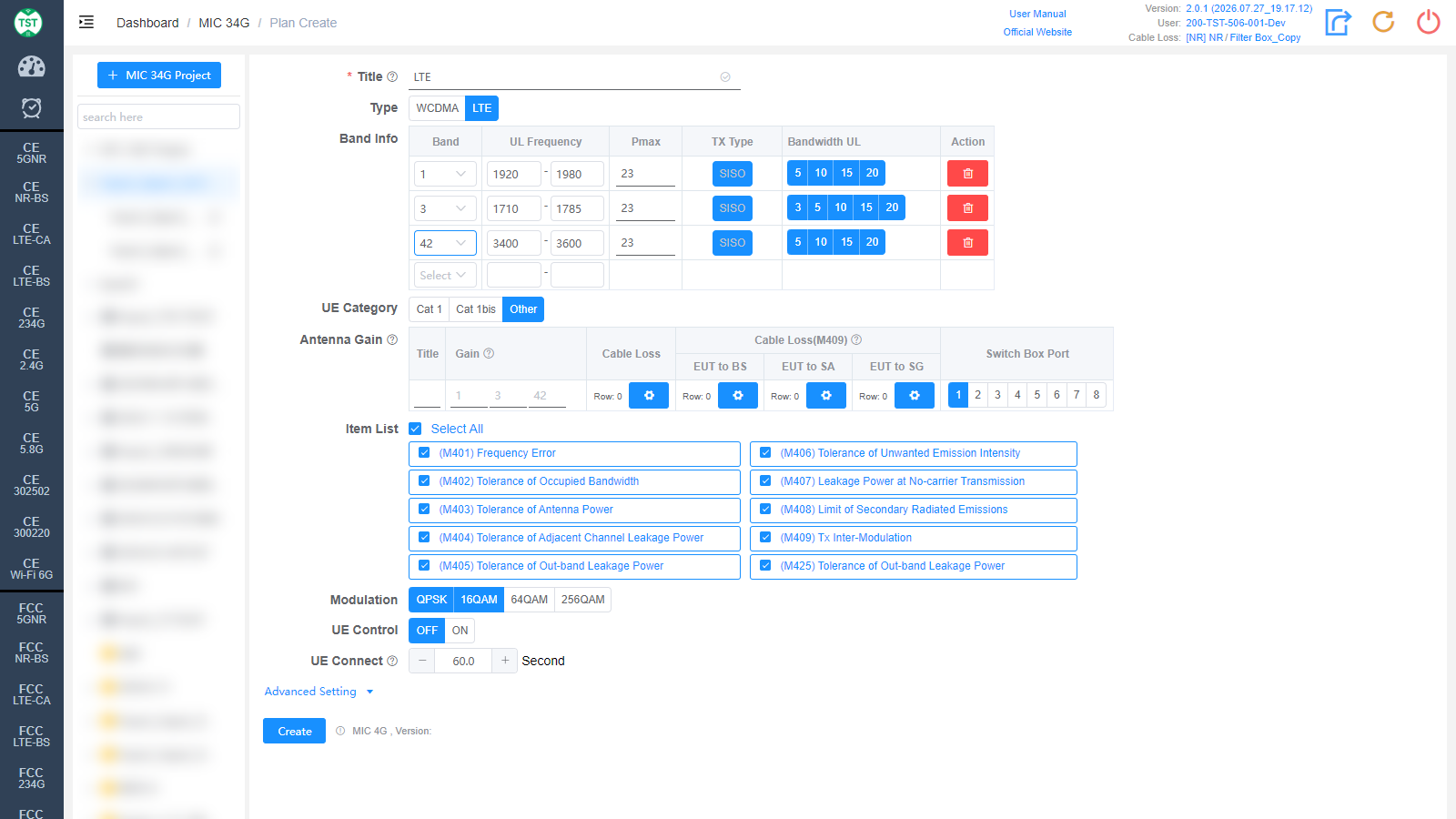
Type: Technical category, select LTE here.
Band Info: LTE bands supported by the product, with an additional Pmax column compared to WCDMA:
Band: LTE band number. Japanese bands are finely subdivided: besides standard bands (1 / 3 / 8 / 42, etc.), there are operator-specific variants such as 1KDDI / 1KDDI-A / 1n / 1p2 / 8a / 8b / 18 / 19 / 21. Select according to the bands declared for the product.
UL Frequency: Uplink frequency range (MHz), filled in automatically.
Pmax: Maximum transmit power (dBm) of the band, default 23 (Power Class 3).
TX Type: Transmission type, fixed to SISO.
Bandwidth UL: Uplink channel bandwidths (MHz) supported by the band, multi-select, e.g., 5 / 10 / 15 / 20. Available options vary by band; select according to the product's actual support.
UE Category: LTE category of the UE (user equipment), default Other:
Cat 1: LTE Category 1, low data rate IoT category.
Cat 1bis: Category 1bis, single-antenna variant with only one receive antenna, common in IoT modules.
Other: Other categories, for devices other than Cat 1 / Cat 1bis.
Antenna Gain: For LTE, in addition to Title / Gain / Cable Loss / Switch Box Port, the following columns are included:
Cable Loss(M409): Dedicated cable loss configuration for the M409 Tx Inter-Modulation test. Compatible only with Bands 34 / 40 / 42.
EUT to BS / EUT to SA / EUT to SG: Cable losses of the three paths from the EUT to the base station emulator (BS) / spectrum analyzer (SA) / signal generator (SG); click the gear icons to configure each.
Item List: Test items included in LTE (MIC 4G), all selected by default:
(M401) Frequency Error
(M402) Tolerance of Occupied Bandwidth
(M403) Tolerance of Antenna Power
(M404) Tolerance of Adjacent Channel Leakage Power
(M405) Tolerance of Out-band Leakage Power
(M406) Tolerance of Unwanted Emission Intensity
(M407) Leakage Power at No-carrier Transmission
(M408) Limit of Secondary Radiated Emissions
(M409) Tx Inter-Modulation
(M425) Tolerance of Out-band Leakage Power
Modulation: Modulations supported by the product, multi-select: QPSK / 16QAM / 64QAM / 256QAM, QPSK + 16QAM selected by default. Select according to the modulations actually supported in the product specification.
Title / UE Control / UE Connect are the same as WCDMA and are not repeated here.
Advanced Setting
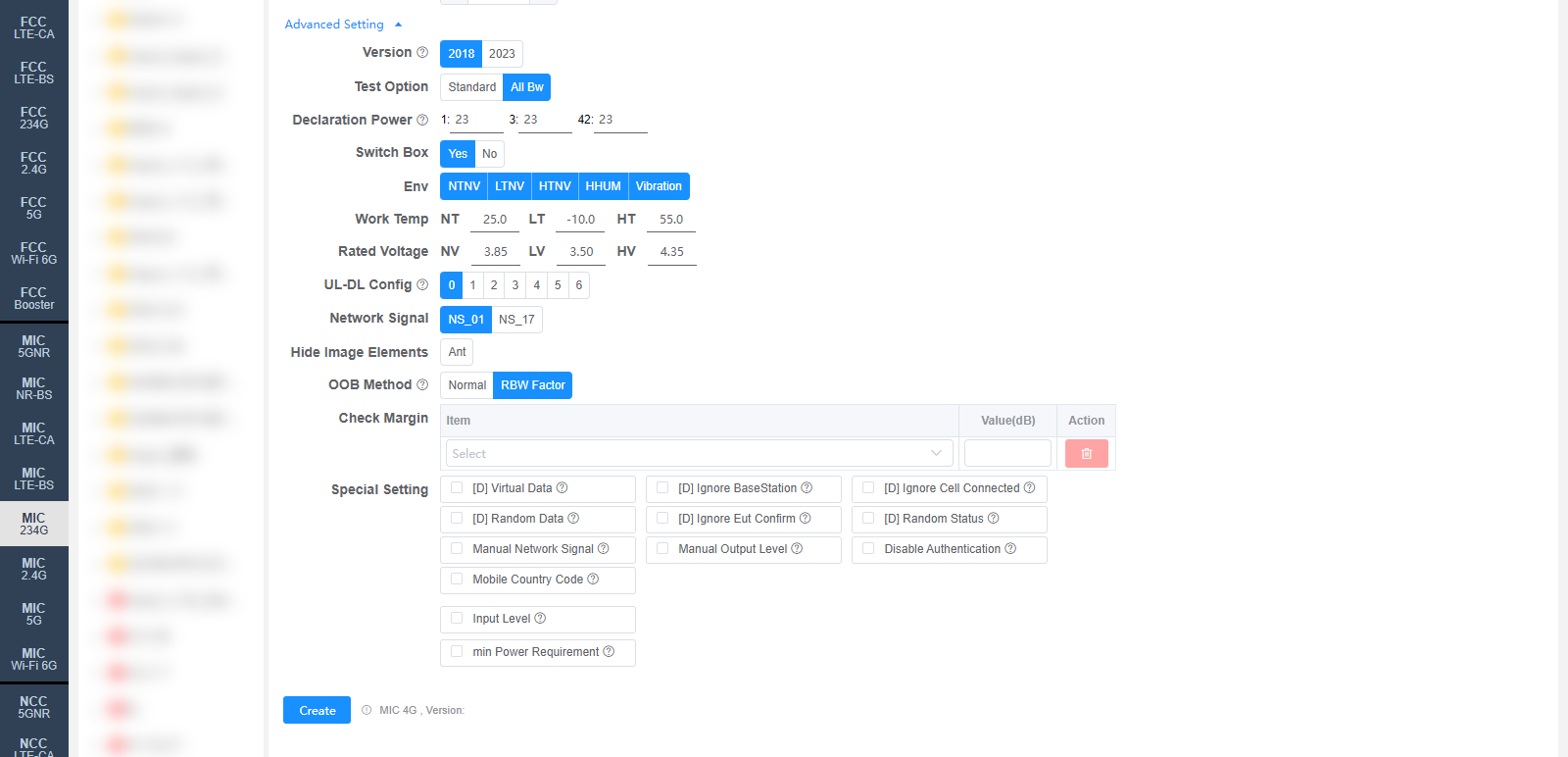
All settings in Advanced Setting can generally be kept at their default values. Adjust them only when the test results are abnormal or there are special test requirements. The figure above takes LTE as an example; WCDMA fields differ slightly, and the differences are marked below.
Version: Regulation version used for testing, selectable 2018 / 2023, default 2018. The default value can be changed on the Setting page.
Test Option: Bandwidth test option, selectable Standard / All Bw (test all bandwidths), default All Bw.
Declaration Power: Declared power (dBm) for each band, defaults to the Pmax in Band Info (e.g., 23). One input box per selected band.
Switch Box: Whether to use a Switch Box (RF switch), default Yes. If a Switch Box has not been purchased, select No, and the product will be directly connected to the spectrum analyzer for testing.
Env: Environmental conditions to test, multi-select, all selected by default: NTNV / LTNV / HTNV / HHUM / Vibration (normal temp / low temp / high temp at nominal voltage, high humidity, vibration).
Work Temp: Temperatures (°C) for the environmental conditions, default NT 25.0 / LT -10.0 / HT 55.0 (normal / low / high temperature).
Rated Voltage: Voltages (V) for the environmental conditions, default NV 3.85 / LV 3.50 / HV 4.35 (nominal / low / high voltage).
UL-DL Config (LTE only): LTE TDD uplink-downlink subframe configuration (0 ~ 6), default 0, corresponding to the TDD UL-DL configurations defined by 3GPP. Only relevant for TDD; it does not affect FDD products.
Network Signal (LTE only): Network Signalling value, selectable NS_01 / NS_17, default NS_01.
Hide Image Elements: Select the elements to hide in report images (e.g., the Ant antenna marker).
OOB Method: Measurement method for M405 / M425 Tolerance of Out-band Leakage Power, selectable Normal / RBW Factor, default RBW Factor. The default value can be changed on the Setting page.
Check Margin: Test margin check. Select an Item and fill in Value(dB); when the margin between the test result and the limit is smaller than the set value, the system will flag it.
Special Setting: Special settings. Options prefixed with [D] are debug options and do not need to be checked for normal testing:
[D] Virtual Data: The system will use virtual data.
[D] Ignore BaseStation: The system will ignore the base station.
[D] Ignore Cell Connected: The system will ignore the cell connected state.
[D] Random Data: The system will use random data.
[D] Ignore Eut Confirm: The system will ignore the EUT confirmation.
[D] Random Status: The system will use random status.
Manual Network Signal: Set the Network Signal manually; the system will not set it for the base station.
Manual Output Level: Set the Output Level manually; the system will not set it for the base station.
Disable Authentication: Disable authentication during the attach procedure.
Mobile Country Code: MCC (Mobile Country Code), range 0-999, default 1. Applicable to Anritsu MT8000 / MT8821.
Input Level: Input level (dBm).
min Power Requirement: Minimum power requirement, default 0 dBm.
Corresponding software options: MIC 3G (WCDMA) / MIC 4G (LTE)